


Posted by Simon Long Oct 26, 2009
Using VMware View Portal in Windows 7
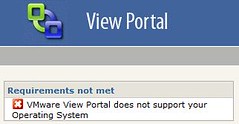 Whilst trying to connect to a VMware View portal on my Windows 7, 64Bit laptop i came across this error.
“VMware View Portal does not support your Operating System”
Well, i wasn’t going to change my OS, so i decided to have a look around to see if anyone else has had this problem. I came across this post on the VMTN Community Forum.
By installing this Registry file: http://www.enhanceie.com/dl/IE8V.reg my Windows 7 laptop is now able to access VMware View portals.
Of course you will remember to Backup your registry before you run the registry file on your Computer, just in case you run into issues.
Note: This was tested using VMware View version 3.1.2. If anyone knows if this is still an issue on VMware View 4 please post a comment.