

vSphere 4 – System Resource Allocation/Reservation
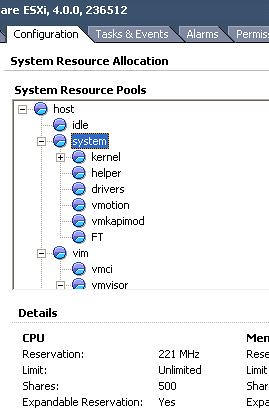
resource reservationsThis is more of a discussion point than a informational Post. I've been trying to find out about what is the best practice for an ESX Hosts System Resource Reservation (Not Resource Pools). What values to use? And should I dive deeper and apply/remove reservations from System Resource Pools (See Screenshot).

I've been reading through these two VMware documents but nothing obvious seems to jump out at me.

It mostly just explains about how Shares/Reservations/Limits and standard Resource Pooling, which I think I already understand well.

Before I moved over to ESXi, it was part of my build document to Reserve 800MB of RAM for the COS. Do I need to reserve anything now? What do you do?

  1. Do you just set a simple CPU and Memory System Resource Reservation? If so what values and why?
  2. Do you dive deeper into the Advanced System Resource Pool Reservations? If so, Why?

I look forward to hearing your thoughts.

Note: I am not talking about Resource Pools. I'm talking about The System Resource Allocation section on the Config tab of an ESX Host. (As seen below)
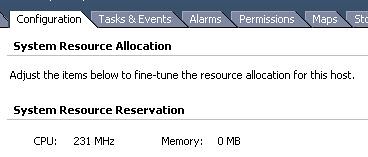
 

Resource Allocation


Related posts:

  1. Allocated Unlimited Memory…Or Have You?
  • Yzel20
    what is resource system management?
  • To be fair, I can not really add anything to the conversation, my ESXi experiance is next to none existent, however personally I would think that there would need to be some reservation as there are still management tasks and overhead of the VMKernel Management interface to consider.
  • anil345

    Simon - In reply to your followup question.

    For me - It really depends on how the VM environment is setup and being used for... our environment has spare resources and DRS is not hyper active all the time. However, we do run quite a few backups during day time and some of them are time consuming because of the server sizing etc.

    If our environment was highly dynamic in the sense of vMotions occuring all the time, VCB backups running, and so on i would actually be interested to increase the reservation a little more than what i have reserved right now. I have seen definite improvements (statistically) by making these changes.
  • Simon, I think one of the things to consider is that you dont' set Resource Pools to "tune" your setup or to make it run smoother. You set Resource Pools to segment the workloads and share the infrastructure among different tenants (to which you delegate the usage of those resources). So you'd want to use them if you are allocating/reserving cpu-cycles and memory for the HR department, for the sales department, for the RD department and so on. If you, as the sysadmin, has a flat view of your internal/external customer base I dont' see a reason why you would want to play with RPs. On the other hand if you want to create a multi-tenant infrastructure where customers buy a certain amount of resources and deal with those resources (i.e. delegating them) then RPs come very handy.

    I manage to say that RPs are key to a cloud-like deployment w/o ever mentioning the word cloud. I am improving :-)

    Massimo.
  • Hi Massimo, I don't think I made my point very well in my post, for which I apologise. I'm specifically talking about the System Resource Reservation on a Host itself. If you see the screenshot above, that is displaying the advance view of the Resource Reservations.

    It seems by default, the host in the screenshot has a CPU reservation of 221MHz (Not set by anyone), but the Memory reservation is 0MB. I'm interested in that. Is it best practice to add a value to this to reserve some memory resource? If so how much?

    I was also asking if anyone actually change any advanced settings, but its seems as though it's not a good idea to go there.

    And thoughts?

    Simon
  • Ops.

    That's what you do when you are lying on a bed in an hotel room with an eye on twitter and the other one on your favorite soap-opera (yeah I am kidding). Sorry. I totally misinterpreted. :-)

    Massimo.
  • Hey Frank, thanks for the Link and Gab, I've never heard that one before..I like it though. :)

    It was part of our companies build document to always make sure Service Console had 800MB Reserved. Now we are using ESXi, I decided to find out exactly what we needed rather than just set a value that someone decided back in v3.x days. So far it seems as though people are just leaving as-is unless instructed to change it by a 3rd-party app vendor.

    Would it not be a good idea to reserve some resource to as a fail-safe? In case for some reason the Host became heavily over subscribed, there would still be resource to manage the Host to fix the issue? If it's as easy as putting 500MB in the "Simple" Memory Resource Reservation, why not do it? or do I have the wrong end of the stick and this Resource Reservation is for something different?

    Simon
  • Best practise it to leave those system resource pool alone, only change it if you know what you are doing and even then reconsider it. Like Gabries fortune cookie wisdom! :)

    I've been writing a lot about resource management lately for a customer and setting memory reservations on resource pool was one of the items. I've posted this subject on my blog, maybe its interesting as well.

    http://frankdenneman.nl/2010/05/resource-pools-memory-reservations/
  • There is an old Chinese saying that goes: "Don't start playing with VMware ESX's default settings, unless you run into a problem". Now if in the design phase of your vSphere environment it becomes clear that your going to run into resources issues, you could start using resource pools, but I seldom use them.

    My last big customer had 700 VMs running and no resource pools where needed to run them all happily. It of course depends on how many resources you have for your VMs and I think monitoring is crucial here.

    Normally the only resource settings I do, is set reservations of cpu and memory for the vCenter VM.

    Gabrie
  • anil345
    I use 1500Mhz for CPU and 800Mb memory reservation for Service Console.

    These values are the recommendation by VMWare for ESX servers running third party apps. In my case that app is vRanger for VM backups.
  • Hey Anil, if you weren't running a 3rd party app, would you just leave them as default?

    Simon
  • anon
    I don't currently but was just thinking the simpler the better! So was thinking of just 2 Resource Pools with just Shares. So Prod Shares would be 2000 and Test Resource Pool would be 1000 .. That way in case of contention Production VM's would get the priority?
  • Ben
    We set the System reservation to 1500MHz. This gives vRanger enough horsepower to run even if the host is busy.
  • Hi Ben, is that recommended by Vizioncore? Do you have a value for Memory?
  • Jeff Adams
    Simon,

    We use vRanger too, and yes, this is a recommendation from Vizioncore.

    vRanger Pro 4.5 Deployment Guide
    http://vizioncore.com/products/vRangerPro/documents/vRangerPro-4.5_DeploymentGuide.pdf

    Page 33-34.

    During standard backup operations, the ESX Service Console is used to run vRanger
    Pro backup tools. The additional performance load placed on the Service Console
    should be addressed by implementing the suggestions below.

    Service Console Configurations

    Vizioncore recommends that the two changes below are made on your ESX hosts to
    optimize the regular backup of VMs. These ESX resource reservations are not
    mandatory and recommended only for operation efficiency.

    • Increase the Service Console CPU Reservation to 1500 MHz

    In the VI Client inventory, select the ESX host > Configuration tab > System
    Resource Allocation. Click the Edit link and adjust the CPU reservation slider up
    to 1500 MHz.

    • Increase the RAM allocated to the Service Console to 800 MB.

    In the VI Client inventory, select the ESX host > Configuration tab > Memory >
    Properties and then modify the amount of RAM from the default of 272MB up
    to 800MB.

    Note This will require a restart of the ESX Server.

    -Jeff
  • TBH this isn't something I do on a general basis, there have been times that third party vendors have asked me to when troubleshooting their software but generally I haven't found the need to. Whether this is correct or incorrect I look forward to learning.
  • Hi Simon

    I was looking at your screenshot and wondering where on earth those resources were specified! I've since located it in vCenter, I didn't even know it existed. Needless to say based on that I wouldn't mess within them.

    I use reservations and limits at resource pool level, I have a cluster made up of quite large hosts that I split into logical pools, i.e. PROD Tier 1, PROD Tier 2, UAT, DEV, etc. I use reservations and limits on these to divide up the compute and memory resources of the cluster.

    I spent a long time reading the documents you mention trying to find out what was the best way to assign this. I decided to proceed as follows, as an example in PROD Tier 1 I have a reservation of 60GHz and limit of 60GHz, my thinking was that this would technically guarantee it the resource but also limit it to go no further, I also do the same for memory, i.e. 60GB reservation and 60GB Limit.

    This gives me a reserved pool which I can then assign VM CPU or memory reservations out from (or sub resource pools if need be). I tend not to assign out reservations to VM’s often as it introduces a complexity headache with the HA slot sizes. So on review none of the CPU reservation is actually ever used because I don’t use VM reservations or have sub pools and only a small percentage of the memory reservation is used, which I believe is the aggregate memory used for VM virtualisation overhead.

    However the general idea that the resource is then guaranteed and limited at the same time holds firm. At least I hope my train of thought is right!! :o)

    PS. I also use shares at the resource pool level to ensure that in contention scenarios between pools that PROD gets high priority, UAT normal priority and DEV low priority
  • Hi Craig, so basically you set a Resource Pool on the Host, you set the limit to a level a little less than the total available resource you have on that Host?

    If that is correct, I guess this way you know there will always be resource spare for the Hypervisor itself.
  • Hi Simon

    The resource pools in this case are within a 5 host HA/DRS cluster. Basically I take the total resources in the cluster and remove a percentage for virtualisation overhead (Approximately 5%) if using HA then you may choose to remove the resources of one host from your total resources (N+1 failover). This is only really necessary if you want to gurantee performance in a failover situation, if you are happy to run with resource contention then you can utilise that resource.

    With what is left I slice up into resource pools at the root level of the cluster. the reservations and limits I'm setting are on these resource pools. Hope that makes sense, technically you could do exactly the same on an individual host if you wanted.
  • I've just read through Frank's article mentioned above. Sometimes you think you've understood what exactly is happening but there seems to always be another layer of complexity lying just underneath :o)

    http://frankdenneman.nl/2010/05/resource-pools-memory-reservations/
  • Its a Rabbit Hole! Good fun though.
  • Michael Poore
    Interesting that you posted this on the same day that Duncan posted his article on limiting vCPUs (http://www.yellow-bricks.com/2010/05/18/limiting-your-vcpu/) as there are some similarities in what's being discussed.

    Personally, I don't touch those pools - I've never found a reason to so far. And, as the saying goes, if it's not broken... The scheduler does a pretty good job of sharing resources which is why I've never been tempted to fiddle with the reservations here although I confess that I'd love to know if anyone else has, why they needed to and what the effects were. Let's hope that someone has some experiences to share.
  • His post did prompt me to post actually! :)

    Do you not set any Resource Reservation Values at all? Not even the "Simple" ones?
blog comments powered by Disqus
Get Adobe Flash playerPlugin by wpburn.com wordpress themes